
Kelas Pintar
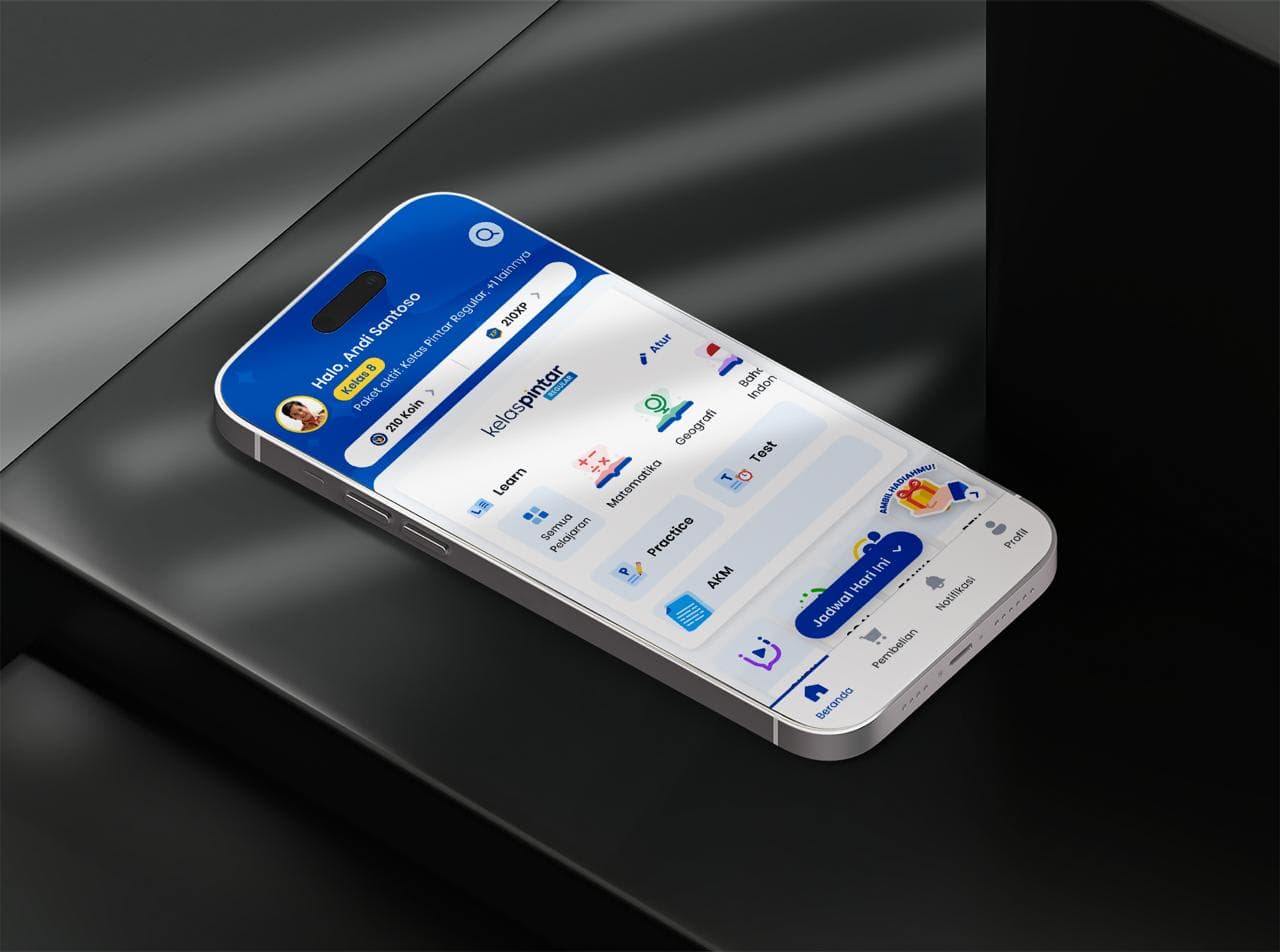
An education technology (EdTech) app developed with React Native, focusing on an advanced Learning Management System (LMS) that supports schools across all levels — from elementary to high school.
As a B2B-focused product, Kelas Pintar collaborates with schools nationwide to enhance digital learning experiences.
It also offers B2C features like GURU (teacher assistance), TANYA (question & answer), SOAL (practice tests), and PTN (university preparation), providing a holistic ecosystem for students and educators alike.
Tech Stack & Tools
Android
iOS
React Native
Typescript

Redux
Axios
Key Features
Learning Management System
A complete digital learning ecosystem designed for elementary, middle, and high school students. The LMS includes interactive learning modules, practice questions, quizzes, exams, attendance tracking, and automated report card generation. All features are optimized to support daily teaching and learning activities in a structured and measurable way.

SOAL
A self-paced practice feature offering thousands of curated questions across various subjects and grade levels. Students can strengthen their understanding through structured exercises that follow the national curriculum and adapt to their learning progress.

TANYA
A flexible question-and-answer feature that allows students to upload photos of problems they don't understand. Questions are answered by real certified tutors, providing personalized explanations and helping students overcome learning obstacles quickly.

GURU
A live teaching platform where students can join real-time online classes guided by professional tutors. This feature supports visual explanations, interactive sessions, and live Q&A, enabling students to learn more effectively with direct guidance.

PTN
A comprehensive preparation program for students aiming to enter Indonesian public universities. It includes talent and interest assessments, extensive question banks, live teaching sessions, and national-level tryouts—helping students prepare confidently and strategically for admission tests.
Multi-Role Access
Kelas Pintar supports multiple user roles—students, teachers, principals, and parents—each with tailored features. Students can study and complete assignments, teachers manage classes and assessments, principals monitor school-wide performance, and parents track their child’s progress. This role-based system ensures every user gets the tools they need in a clear and focused experience.
Development Journey
Project Vision & Motivation
Kelas Pintar is an education technology platform designed to enhance learning for students across Indonesia. What began as a multi-stack system—built separately with Swift Storyboard for iOS, Java for Android, and Flutter for specific modules—eventually became difficult to maintain. Each feature update required changes across multiple codebases, slowing development and leading to inconsistent user experiences.
As the product continued to grow, so did the need for a more unified and scalable foundation. This led to the decision to fully revamp the application. Instead of patching the old architecture, we rebuilt it from scratch using React Native and TypeScript, aligning the platform with modern development standards while enabling faster iteration and cleaner, more structured code.
The revamp consolidated all LMS and B2C features—ranging from learning modules, practice questions, quizzes, exams, and attendance to tutoring services like SOAL, TANYA, GURU, and PTN—into a single cohesive application. I contributed end-to-end throughout the rebuild: designing the architecture, implementing the core features, integrating services, optimizing performance, and supporting the release process.
The result is a refreshed, scalable, and maintainable application that delivers a smoother and more consistent learning experience for students, teachers, and general users across the country.
Challenges Faced
Fragmented Multi-Stack Codebase
The old version used Swift, Java, and Flutter. Each update required changes in three separate codebases, causing inconsistent features, slower releases, and high maintenance overhead.
Outdated and Inconsistent UI/UX
Different technologies resulted in inconsistent UI components and behaviors across iOS, Android, and Flutter. The visual design also felt outdated compared to modern EdTech apps.
Complex LMS Features That Were Hard to Scale
Features like exams, attendance, question banks, and report cards required complex data flows. The previous architecture scattered logic across multiple native files, making scaling extremely difficult.
Solutions Implemented
Unified React Native + TypeScript Codebase
Using React Native allowed us to consolidate everything into a single codebase for both platforms. This drastically improved development speed, consistency, and long-term maintainability.
Modernized UI with a Centralized Design System
We redesigned the entire interface with modern components, consistent interactions, better animations, and a unified design system to ensure a smooth cross-platform experience.
Clean Architecture with Modular Feature Separation
We implemented a clear structure separating logic, UI components, hooks, and styles. This improved readability, testability, and scaling for complex LMS features like exams and report generation.
Projects Showcase
Key Learnings & Takeaways
Consolidating Multi-Tech Projects Dramatically Boosts Efficiency
Migrating from three different technologies into a single cross-platform codebase showed how much faster and cleaner development can be. Collaboration improved, bugs decreased, and releases became smoother.
Strong Typing Is Essential for Large-Scale Education Apps
With complex LMS features and large datasets—exam answers, attendance logs, student progress, report cards—TypeScript provided reliability and prevented runtime errors that previously occurred due to loose data handling.
EdTech Requires Intuitive and Accessible UX
Designing for students of various ages and school levels taught me how important it is to create layouts that are simple, readable, and usable even on lower-end devices commonly used in Indonesia.
Proper Architecture Enables Feature Scalability
Modular architecture made it possible to scale heavy features like exams, interactive learning content, and live classes without the codebase becoming chaotic.
Let’s Build Something Amazing Together
Ready to take your ideas to reality? I’m always excited to work on new challenges and create innovative solutions.